Decoding Xunlei Thunder Links: Python and JavaScript Conversion Examples
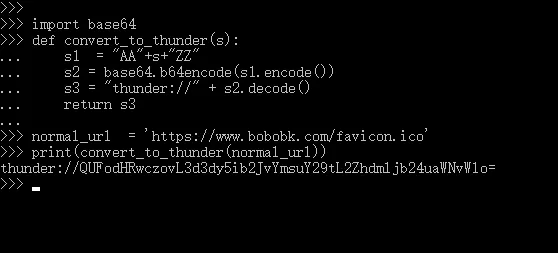
Many people come across Xunlei links that start with thunder://. They do not look like normal http or https URLs, but in many cases they are simply ordinary URLs wrapped in a fixed format.
If you just want to understand that format, or convert between a regular URL and a thunder:// link in code, this article covers the common rule. It focuses on the encoding format itself, not on whether a resource is downloadable.
For example, a random download link is:
https://www.bobobk.com/favicon.ico
The basic thunder-link rule
The most common thunder:// format can be understood like this:
- Add
AAbefore the original URL - Add
ZZafter the original URL - Base64 encode the whole string
- Add the
thunder://prefix in front
So it is not a completely different protocol in itself. In practice, it is often just a fixed string wrapper.
1. Converting a Regular URL to a Xunlei Link
1.1 Add AA to the beginning and ZZ to the end
The string becomes:
AAhttps://www.bobobk.com/favicon.icoZZ
1.2 Base64 encode it
QUFodHRwczovL3d3dy5ib2JvYmsuY29tL2Zhdmljb24uaWNvWlo=
1.3 Add thunder:// in front
thunder://QUFodHRwczovL3d3dy5ib2JvYmsuY29tL2Zhdmljb24uaWNvWlo=
Conversion Code
import base64


def convert_to_thunder(url: str) -> str:
        wrapped = "AA" + url + "ZZ"
        encoded = base64.b64encode(wrapped.encode("utf-8")).decode("utf-8")
        return "thunder://" + encoded


normal_url = 'https://www.bobobk.com/favicon.ico'
print(convert_to_thunder(normal_url))
2. Converting a Xunlei Link to a Regular URL
2.1 Remove the thunder:// prefix
The address becomes:
QUFodHRwczovL3d3dy5ib2JvYmsuY29tL2Zhdmljb24uaWNvWlo=
2.2 Base64 decode it
AAhttps://www.bobobk.com/favicon.icoZZ
2.3 Remove AA from the front and ZZ from the back
https://www.bobobk.com/favicon.ico
Conversion Code
import base64


def convert_thunder(thunder_url: str) -> str:
        encoded = thunder_url.strip().split("//", 1)[1]
        decoded = base64.b64decode(encoded).decode("utf-8")
        return decoded[2:-2]


thunder = 'thunder://QUFodHRwczovL3d3dy5ib2JvYmsuY29tL2Zhdmljb24uaWNvWlo='
print(convert_thunder(thunder))
JavaScript Code
If you only want a quick browser-side conversion, JavaScript can also do it directly.
function decodeThunder(thunderUrl) {
    const encoded = thunderUrl.replace(/^thunder:\/\//, "");
    const decoded = window.atob(encoded);
    return decoded.substring(2, decoded.length - 2);
}

function encodeThunder(normalUrl) {
    const encoded = window.btoa("AA" + normalUrl + "ZZ");
    return "thunder://" + encoded;
}

document.querySelector('#decoded').innerHTML = decodeThunder(
    document.querySelector('#de_thunder').value
);

document.querySelector('#encoded').innerHTML = encodeThunder(
    document.querySelector('#en_thunder').value
);
Two practical notes
- Not every
thunder://link necessarily points to a resource that is still available. The original resource still has to exist and be accessible. - If you are processing links in batch, add error handling in code because malformed Base64 input can raise decoding exceptions.
Conclusion
This article explained the most common rule behind thunder:// links: wrap the original URL with AA and ZZ, Base64 encode it, and prepend the thunder:// prefix.
If you only need a simple converter, both Python and JavaScript are enough to implement it quickly. You can also use the ready-made page at Chunjiang Muker Xunlei Encryption and Parsing.
- 原文作者:春江暮客
- 原文链接:https://www.bobobk.com/en/299.html
- 版权声明:本作品采用 知识共享署名-非商业性使用-禁止演绎 4.0 国际许可协议 进行许可,非商业转载请注明出处(作者,原文链接),商业转载请联系作者获得授权。