How to Convert Between YAML and JSON (Complete Python/JavaScript Guide)
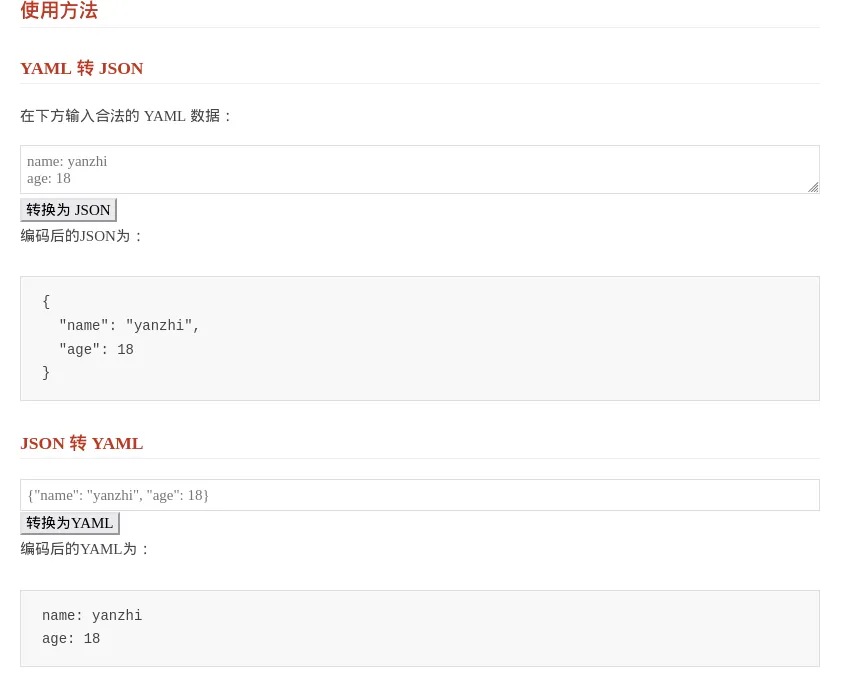
If you move frequently between config files, API payloads, and browser-side tools, converting between YAML and JSON becomes a recurring task.
The most common cases are:
- DevOps and service configs are written in YAML, but API tooling expects JSON
- You want a browser-based converter for quick copy-paste testing
- Your scripts need to turn human-readable config into machine-friendly data
This guide stays practical:
- Use Python for command-line and batch conversion
- Use JavaScript for browser-side real-time conversion
- Add validation and troubleshooting so the result is actually safe to use
Why Convert Between YAML and JSON?
In microservice architectures and DevOps practices, we often encounter scenarios like:
- Configuration management (YAML is more human-readable)
- API data interchange (JSON is the web standard format)
- Multi-cloud deployment (different platforms have different format requirements)
- Data persistence (JSON is easier to compress and store)
Efficient YAML to JSON Conversion with Python
1.1 Preparation
pip install pyyaml
For local testing, installing this in a virtual environment is usually enough.
Complete YAML to JSON Conversion Process
import yaml
import json
import sys
import os

def yaml_to_json(yaml_str):
    try:
        data = yaml.safe_load(yaml_str)
        return json.dumps(data, indent=2, ensure_ascii=False, default=str)
    except yaml.YAMLError as e:
        print(f"YAML parsing error: {e.problem} {e.context}")
    except Exception as e:
        print(f"Unknown error: {str(e)}")

if __name__ == "__main__":
    if len(sys.argv) > 1:
        yaml_file = sys.argv[1]
        if not os.path.isfile(yaml_file):
            print(f"File not found: {yaml_file}")
            sys.exit(1)

        with open(yaml_file, 'r', encoding='utf-8') as f:
            yaml_content = f.read()

        json_output = yaml_to_json(yaml_content)
        json_file = os.path.splitext(yaml_file)[0] + ".json"

        with open(json_file, 'w', encoding='utf-8') as f:
            f.write(json_output)

        print(f"Successfully converted YAML to JSON, output file: {json_file}")
    else:
        # Default test data
        yaml_content = """
param:
  Author: Yanzhi
  Email: yanzhi@bobobk.com
  Sample: RNA
  Number: 12
  Source: Lab

data:
  indexdir: /index/
  filedir: /rawdata
  filenames:
    - MERS_set2_0h_1
    - MERS_set2_0h_2
    - MERS_set2_16h_1
    - MERS_set2_16h_2
    - MERS_set2_48h_1
    - MERS_set2_48h_2
    - SARS_0h_1
    - SARS_0h_2
    - SARS_16h_1
    - SARS_16h_2
    - SARS_48h_1
    - SARS_48h_2
"""
        print(yaml_to_json(yaml_content))
{
  "param": {
    "Author": "Yanzhi",
    "Email": "yanzhi@bobobk.com",
    "Sample": "RNA",
    "Number": 12,
    "Source": "Lab"
  },
  "data": {
    "indexdir": "/index/",
    "filedir": "/rawdata",
    "filenames": [
      "MERS_set2_0h_1",
      "MERS_set2_0h_2",
      "MERS_set2_16h_1",
      "MERS_set2_16h_2",
      "MERS_set2_48h_1",
      "MERS_set2_48h_2",
      "SARS_0h_1",
      "SARS_0h_2",
      "SARS_16h_1",
      "SARS_16h_2",
      "SARS_48h_1",
      "SARS_48h_2"
    ]
  }
}
Key Feature Explanation:
python yaml_to_json.py config.yaml
This script pattern is useful when you need to process existing config files in bulk, especially for CI files, deployment settings, or API examples.
Advanced JSON to YAML Usage
import json
import yaml
import sys
import os

def json_to_yaml(json_str):
    try:
        data = json.loads(json_str)
        return yaml.dump(data, allow_unicode=True, sort_keys=False)
    except json.JSONDecodeError as e:
        print(f"JSON parsing error: {e.msg} at line {e.lineno} column {e.colno}")
    except Exception as e:
        print(f"Unknown error: {str(e)}")

if __name__ == "__main__":
    if len(sys.argv) > 1:
        json_file = sys.argv[1]
        if not os.path.isfile(json_file):
            print(f"File not found: {json_file}")
            sys.exit(1)

        with open(json_file, 'r', encoding='utf-8') as f:
            json_content = f.read()

        yaml_output = json_to_yaml(json_content)
        yaml_file = os.path.splitext(json_file)[0] + ".yaml"

        with open(yaml_file, 'w', encoding='utf-8') as f:
            f.write(yaml_output)

        print(f"Successfully converted JSON to YAML, output file: {yaml_file}")
    else:
        # Test JSON data (consistent structure with previous YAML test data)
        json_content = """
{
  "param": {
    "Author": "Yanzhi",
    "Email": "yanzhi@bobobk.com",
    "Sample": "RNA",
    "Number": 12,
    "Source": "Lab"
  },
  "data": {
    "indexdir": "/index/",
    "filedir": "/rawdata",
    "filenames": [
      "MERS_set2_0h_1",
      "MERS_set2_0h_2",
      "MERS_set2_16h_1",
      "MERS_set2_16h_2",
      "MERS_set2_48h_1",
      "MERS_set2_48h_2",
      "SARS_0h_1",
      "SARS_0h_2",
      "SARS_16h_1",
      "SARS_16h_2",
      "SARS_48h_1",
      "SARS_48h_2"
    ]
  }
}
"""
        print(json_to_yaml(json_content))
param:
  Author: Yanzhi
  Email: yanzhi@bobobk.com
  Sample: RNA
  Number: 12
  Source: Lab
data:
  indexdir: /index/
  filedir: /rawdata
  filenames:
  - MERS_set2_0h_1
  - MERS_set2_0h_2
  - MERS_set2_16h_1
  - MERS_set2_16h_2
  - MERS_set2_48h_1
  - MERS_set2_48h_2
  - SARS_0h_1
  - SARS_0h_2
  - SARS_16h_1
  - SARS_16h_2
  - SARS_48h_1
  - SARS_48h_2
If you want to preserve field order as much as possible, keep sort_keys=False in yaml.dump(...). Removing it may reorder the exported YAML structure.
JavaScript Browser-Side Solution
Browser-side implementation
JSON to YAML
  <script>
    function convertToYaml() {
      const input = document.getElementById("jsonInput").value;
      const output = document.getElementById("yamlOutput");
      try {
        const obj = JSON.parse(input);
        const yaml = jsyaml.dump(obj, { sortKeys: false });
        output.textContent = yaml;
      } catch (e) {
        output.textContent = "❌ JSON parsing error: " + e.message;
      }
    }
  </script>
YAML to JSON
    function convertToJson() {
      const yamlText = document.getElementById("yamlInput").value;
      const output = document.getElementById("outputArea");
      try {
        const obj = jsyaml.load(yamlText);
        const json = JSON.stringify(obj, null, 2);
        output.textContent = json;
      } catch (e) {
        output.textContent = "❌ YAML parsing error: " + e.message;
      }
    }
How to validate the conversion result
After conversion, it is worth checking at least these three points:
- The JSON output can still be parsed by
json.loads()or browserJSON.parse() - The YAML output can still be parsed by
yaml.safe_load() - Key fields, array lengths, and nesting levels are unchanged
The fastest practical check is a round-trip conversion:
python yaml_to_json.py config.yaml
python json_to_yaml.py config.json
If the structure remains consistent after the round trip, the conversion is usually in good shape.
Common errors and fixes
1. YAML parsing errors
Most common cause: inconsistent indentation, missing spaces after colons, or broken list nesting.
Fix:
- Use spaces consistently and avoid tabs
- Check each mapping uses the
key: valueform - Start with a minimal sample before switching back to the full file
2. JSON parsing errors
Most common cause: trailing commas or strings that are not wrapped in double quotes.
Fix:
- Remove trailing commas from the last object or array element
- Ensure strings use double quotes
- Run
JSON.parse()in the browser console to pinpoint the issue quickly
3. Non-ASCII text becomes escaped output
If your JSON contains many \uXXXX sequences, the encoding options are usually the issue.
Fix:
- Keep
ensure_ascii=Falsewhen dumping JSON in Python - Read and write files with
encoding='utf-8'
Related reading
If you want to connect format conversion with a broader content or SEO automation workflow, continue with:
- 2026 Webmaster Playbook: Automate llms.txt for AI Search with Python
- How to Improve Website Indexing Speed with IndexNow
Summary
Converting between YAML and JSON is not just a syntax change. It is a way to move the same structured data across different tools and workflows.
Use Python when you care about batch processing and automation. Use browser-side JavaScript when you want a quick interactive converter. Once you add validation and error handling, the conversion flow becomes much more reliable for daily work.
Online Version
Generate HTML based on the JavaScript version: Online YAML JSON converter
Core Differences and Best Practices
Format Comparison
| Feature | YAML | JSON |
|---|---|---|
| Comments | Supports # comments |
Not supported |
| Data Types | Extended types (date, regex) | Basic types |
| Readability | High | Medium |
| File Size | Smaller | Larger |
- Needs human editing? → Choose YAML
- Needs strict Schema? → Choose JSON
- Needs cross-platform transfer? → Choose JSON
- Needs version control? → Choose YAML (differences are clearer)
Common Problem Solutions
Special character escaping: JSON requires escaping double quotes, while YAML supports a mix of single and double quotes.
Date format handling:
# Python custom converter
class SafeDateYamlLoader(yaml.SafeLoader):
    pass

def timestamp_constructor(loader, node):
    return datetime.fromisoformat(loader.construct_scalar(node))

SafeDateYamlLoader.add_constructor('!datetime', timestamp_constructor)
Large file processing techniques: Read and convert in chunks.
Conclusion
Through this detailed guide, you should now have a solid understanding of:
- The core methods for format conversion in both languages.
- The best practices for different scenarios.
- Strategies for handling common issues.
Practical Application Suggestions:
- Prioritize YAML for configuration management.
- Recommend JSON format for API interactions.
- Pay attention to compatibility for complex data types.
Mastering format conversion skills will significantly boost your development efficiency. It’s recommended to combine this with getting a ChatGPT API key for automated script development and building intelligent data processing workflows.
- 原文作者:春江暮客
- 原文链接:https://www.bobobk.com/en/convert-yaml-to-json.html
- 版权声明:本作品采用 知识共享署名-非商业性使用-禁止演绎 4.0 国际许可协议 进行许可,非商业转载请注明出处(作者,原文链接),商业转载请联系作者获得授权。