Beginner Guide: Auto-build and Deploy a Hugo Site with GitHub Actions
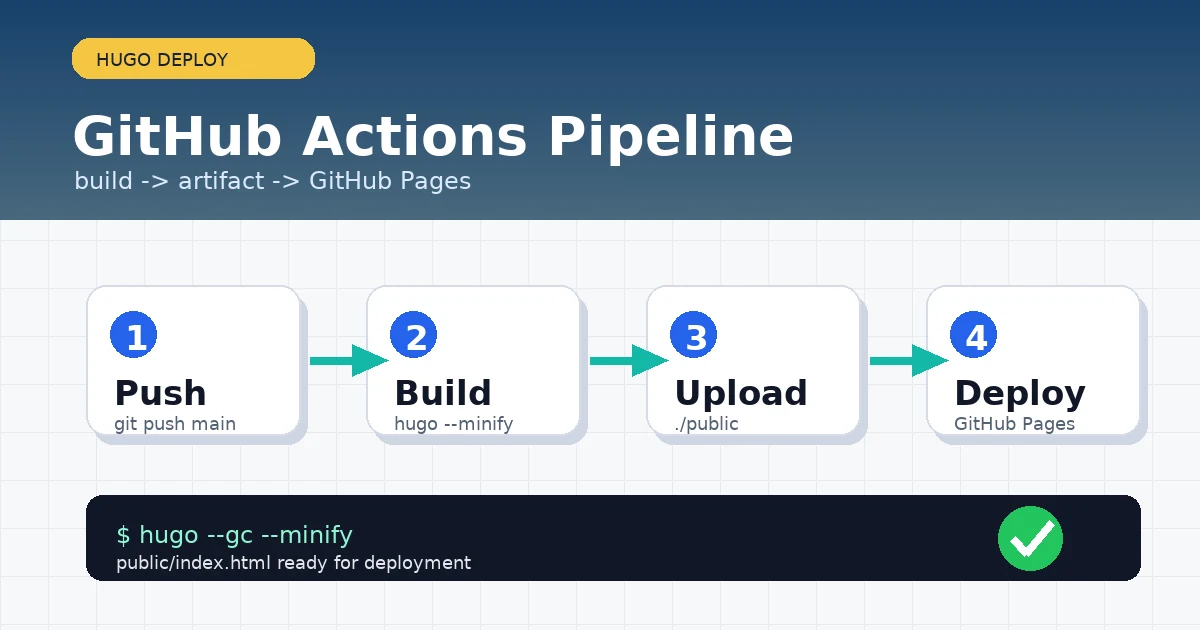
Manually running hugo, uploading the public directory, and checking the live page is easy to forget. A more reliable approach is to let GitHub Actions build the Hugo site after every push, then publish the generated output to GitHub Pages.
This guide is written for readers who are new to Hugo and GitHub Actions. By the end, you will have a copyable .github/workflows/hugo.yaml, and publishing a new article will only require git push.
Method 1: Confirm Hugo builds locally first
Before automating deployment, make sure the local build works. Enter the Hugo project root:
hugo version
hugo --gc --minify
If the command succeeds, the project root will contain public/:
ls public
Typical output looks like this:
404.html
categories
index.html
posts
tags
If the local build fails, fix that first. GitHub Actions only runs commands automatically; it will not fix theme, config, or Markdown problems for you.
Method 2: Enable GitHub Actions as the Pages source
In your GitHub repository:
- Open
Settings - Go to
Pages - In
Build and deployment, changeSourcetoGitHub Actions
This step matters. If Pages still points to a branch directory, a successful workflow may not use the Actions deployment output.
Prerequisites
Make sure the project is already committed to Git and that the default branch is main. If your default branch is master, update the workflow branch name later.
git status --short
git branch --show-current
If the workflow directory does not exist, create it:
mkdir -p .github/workflows
Implementation: Create hugo.yaml
Create the file:
nano .github/workflows/hugo.yaml
Paste this configuration:
name: Build and deploy Hugo site

on:
  push:
    branches:
      - main
  workflow_dispatch:

permissions:
  contents: read
  pages: write
  id-token: write

concurrency:
  group: pages
  cancel-in-progress: false

defaults:
  run:
    shell: bash

jobs:
  build:
    runs-on: ubuntu-latest
    env:
      HUGO_VERSION: 0.161.1
    steps:
      - name: Checkout
        uses: actions/checkout@v6
        with:
          submodules: recursive
          fetch-depth: 0

      - name: Setup Pages
        id: pages
        uses: actions/configure-pages@v6

      - name: Install Hugo
        run: |
          mkdir -p "${HOME}/.local/hugo"
          curl -sLJO "https://github.com/gohugoio/hugo/releases/download/v${HUGO_VERSION}/hugo_extended_${HUGO_VERSION}_linux-amd64.tar.gz"
          tar -C "${HOME}/.local/hugo" -xf "hugo_extended_${HUGO_VERSION}_linux-amd64.tar.gz"
          echo "${HOME}/.local/hugo" >> "${GITHUB_PATH}"

      - name: Verify Hugo
        run: hugo version

      - name: Build site
        run: |
          hugo \
            --gc \
            --minify \
            --baseURL "${{ steps.pages.outputs.base_url }}/"

      - name: Upload artifact
        uses: actions/upload-pages-artifact@v5
        with:
          path: ./public

  deploy:
    environment:
      name: github-pages
      url: ${{ steps.deployment.outputs.page_url }}
    runs-on: ubuntu-latest
    needs: build
    steps:
      - name: Deploy to GitHub Pages
        id: deployment
        uses: actions/deploy-pages@v5
If your theme does not require Hugo extended, you can change hugo_extended_ in the downloaded file name to hugo_. Many modern themes use Sass, so beginners should usually keep the extended version.
Commit and trigger deployment
Save the file and commit it:
git add .github/workflows/hugo.yaml
git commit -m "Add Hugo GitHub Pages workflow"
git push
After pushing, open the repository Actions page. You should see Build and deploy Hugo site running.
Validation
After the workflow succeeds, open the deployment record and check the site URL from the Deploy to GitHub Pages step.
You can also check the key output file locally first:
test -f public/index.html && echo "index exists"
If you use a custom domain, check whether static/CNAME or public/CNAME is generated correctly:
find static public -name CNAME -print
Troubleshooting
1. Actions succeeds but the site shows 404
The usual cause is that the Pages source is not set to GitHub Actions, or the deployment has not finished yet.
Fix it here:
Settings -> Pages -> Source -> GitHub Actions
Then rerun the workflow.
2. Theme files are missing
If your theme is a Git submodule, checkout must include:
with:
  submodules: recursive
  fetch-depth: 0
If the submodule was not committed correctly, check it locally:
git submodule status
3. CSS is broken because baseURL is wrong
If the page opens but styles are missing, baseURL is often wrong. The workflow above uses the URL output from GitHub Pages:
--baseURL "${{ steps.pages.outputs.base_url }}/"
For a custom domain, you can also set a fixed address in the Hugo config:
baseURL: "https://www.example.com/"
4. Hugo versions do not match
If the local build works but Actions fails, compare versions first:
hugo version
Then update the workflow version to match your local version:
env:
  HUGO_VERSION: 0.161.1
Summary
The workflow is simple: confirm Hugo builds locally, switch GitHub Pages to the Actions source, then build public/ and deploy it from the workflow. Beginners do not need to understand every CI/CD concept on day one; getting a working deployment path matters first. After that, every new article can be published with a normal commit and push.
- 原文作者:春江暮客
- 原文链接:https://www.bobobk.com/en/github-actions-hugo-deploy.html
- 版权声明:本作品采用 知识共享署名-非商业性使用-禁止演绎 4.0 国际许可协议 进行许可,非商业转载请注明出处(作者,原文链接),商业转载请联系作者获得授权。