Sharing These Python Tips

Despite having programmed in Python for many years, I’m still amazed by how clean the code can be and how well it adheres to the DRY (Don’t Repeat Yourself) programming principle. My experience over the years has taught me many small tricks and pieces of knowledge, mostly gained from reading popular open-source software like Django, Flask, and Requests.

Here are a few tips I’ve picked out that are often overlooked, but can genuinely help us in daily programming.


1. Dictionary Comprehensions and Set Comprehensions

Most Python programmers know and use list comprehensions. If you’re not familiar with the concept of list comprehensions, it’s a shorter, more concise way to create a list.

>>> some_list = [1, 2, 3, 4]

>>> another_list = [ x + 1 for x in some_list ]

>>> another_list
[2, 3, 4, 5]

Since Python 3, we can use the same syntax to create sets and dictionaries:

……
阅读全文

Python Class Inheritance and Polymorphism

In Object-Oriented Programming (OOP), when defining a class, you can inherit from an existing class. The new class is called a Subclass, and the inherited class is called a Base class, Parent class, or Super class.

Format:

SubclassName(ParentClassName):
	pass

Usage Example

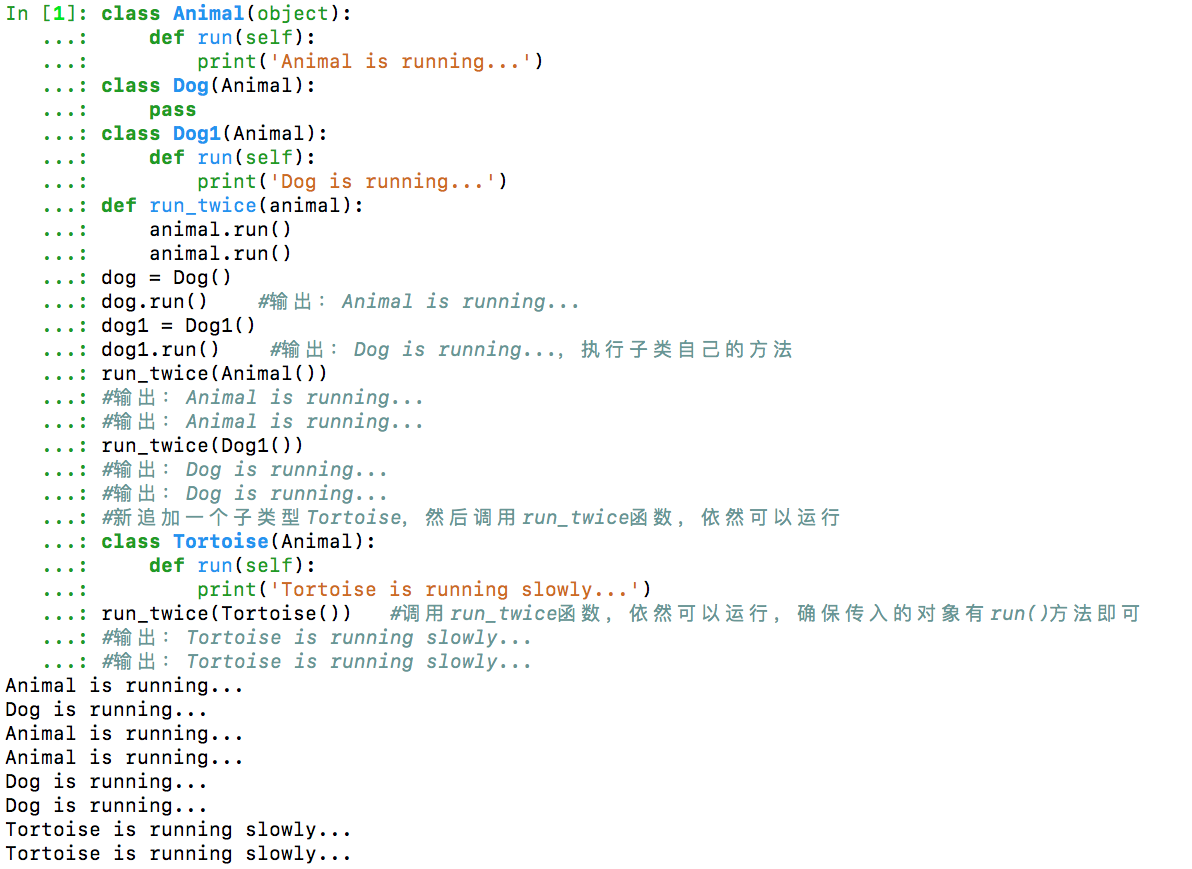
class Animal(object):
    def run(self):
        print('Animal is running...')
class Dog(Animal):
    pass
class Dog1(Animal):
    def run(self):
        print('Dog is running...')
def run_twice(animal):
    animal.run()
    animal.run()
dog = Dog()
dog.run()    # Output: Animal is running...
dog1 = Dog1()
dog1.run()    # Output: Dog is running..., executes the subclass's own method
run_twice(Animal())
# Output: Animal is running...
run_twice(Dog1())
# Output: Dog is running...
# Add a new subclass Tortoise, then call the run_twice function, it still works
class Tortoise(Animal):
    def run(self):
        print('Tortoise is running slowly...')
run_twice(Tortoise())    # Calling run_twice function, it still works, just ensure the passed object has a run() method
# Output: Tortoise is running slowly...

class_exam

……

阅读全文

Process Pools, Thread Pools, and Coroutines in Python

Neither threads nor processes can be opened indefinitely; they will always consume and occupy resources. Hardware has limited capacity. While ensuring high-efficiency work, hardware resource utilization should also be guaranteed. Therefore, an upper limit needs to be set for hardware to alleviate its pressure, which led to the concept of pools.……

阅读全文

Summary of Python3 print function usage

Python 3 makes the print function more explicit compared to Python 2.

1. Outputting Strings and Numbers

print("runoob") # Outputs string runoob

print(100) # Outputs number 100

str = 'runoob'

print(str) # Outputs variable runoob

L = [1,2,'a'] # List

print(L) [1, 2, 'a']

t = (1,2,'a') # Tuple

print(t) (1, 2, 'a')

d = {'a':1, 'b':2} # Dictionary

print(d) {'a': 1, 'b': 2}

2. Formatted Integer Output

Supports parameter formatting, similar to C language’s printf.

str = "the length of (%s) is %d" %('runoob',len('runoob'))

print(str) # the length of (runoob) is 6

Python String Formatting Symbols:

** Symbol** Description
%c Formats character and its ASCII code
%s Formats string
%d Formats signed decimal integer
%u Formats unsigned decimal integer
%o Formats unsigned octal number
%x Formats unsigned hexadecimal number (lowercase)
%X Formats unsigned hexadecimal number (uppercase)
%f Formats floating-point number, precision can be specified after decimal point
%e Formats floating-point number in scientific notation (lowercase ’e')
%E Same as %e, formats floating-point number in scientific notation (uppercase ‘E’)
%g Shorthand for %f and %e
%G Shorthand for %f and %E
%p Formats variable’s address in hexadecimal

Formatting Operator Auxiliary Directives:

……

阅读全文

Python Data Visualization - The Post-2000 Gaokao Generation

The post-2000 generation has finished their Gaokao (National College Entrance Examination), and there’s been extensive media coverage (they are the “fresh meat” generation, after all!). Many reports focused on this year’s examinee data, presenting it with stunning charts. Feeling a bit jealous about how beautiful those charts are? Do you want to try making one yourself? These charts are actually products of data visualization created with Python, so yes, you can definitely make them yourself!


Preparation

  1. Libraries

    • charts
    • pyecharts
  2. Data

    • Collected directly from Baidu.

Common Chart Types

Bar charts and line charts are frequently seen and used, so let’s start with the basics.

1. Bar Chart

# Number of Gaokao examinees
gaokao_num = [940,940,...,375]
gaokao_num.reverse()
# Number of admitted students
luqu_num = [700,705,...,221]
luqu_num.reverse()
# Admission rate
luqu_lev= [74.46,75,...,59]
luqu_lev.reverse()

import charts

options = {
    'chart'   : {'zoomType':'xy'},
    # Title
    'title'   : {'text': '2000-2017 Gaokao Data'},
    # Subtitle
    'subtitle': {'text': 'Source: edu.sina.com.cn'},
    # X-axis
    'xAxis'   : {'categories': ['2000',...,'2017']},
    # Y-axis
    'yAxis'   : {'title': {'text': 'Million people/year'}},
    }
series =  [{
    'type': 'column',
    'name': 'Number of Gaokao Examinees',
    'data': gaokao_num
},{
    'type': 'column',
    'name': 'Number of Admitted Students',
    'data': luqu_num
}
]
charts.plot(series, options=options, show='inline')

Due to a minor issue with my pyecharts setup, I used the charts library. Using pyecharts is even simpler, but I won’t repeat it here. You can check the source code if needed.

……

阅读全文

Parallelism in One Line of Python Code

Python has a somewhat notorious reputation when it comes to program parallelization. Technical issues aside, such as thread implementation and the GIL, I believe incorrect teaching guidance is the main problem. Common classic Python multithreading and multiprocessing tutorials often seem “heavy” and tend to scratch the surface without deeply exploring the most useful content for daily work.……

阅读全文

Closing a Screen Session from Outside the Session

Screen is an excellent tool for running programs in the background. Typically, you can connect to a session using screen -r and then close the session with Ctrl + C. However, if you’ve implemented exception handling (like try-except) in your Python scripts, you’ll find that this only breaks out of the loop and doesn’t terminate the entire session. In such cases, directly closing a specific session from outside the session is much more convenient.

The command to do this is:

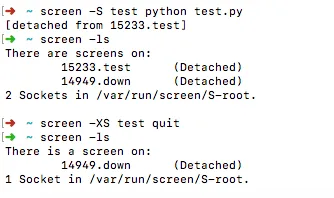
screen -XS test quit

Here, test is the name of your session. Of course, to view all active sessions, you can use:

screen -ls

Here’s an example sequence of commands:

screen -S test python test.py
screen -ls
screen -XS test quit
screen -ls

screen_test

……

阅读全文

Running Conda Command-Line Scripts on Windows

I needed to remotely update website content from my Windows machine at home, and while I have Conda installed on Windows, I found I couldn’t directly write and run scripts. I could only launch Conda from the Start menu and type commands line by line.

After some searching and learning, I finally found a solution.

The reason you can’t directly write and run .bat batch files for Conda commands (which use various Python libraries from Conda) is that the default cmd.exe doesn’t activate the Conda environment. Once you add the environment activation command, your scripts will run. You can refer to the original English explanation here: https://stackoverflow.com/questions/46305569/how-to-make-batch-files-run-in-anaconda-prompt.

The final command structure looks like this:

call 'G:/conda/Scripts/activate.bat' 
scrapy crawl dou
python tupian.py
python post.py
……

阅读全文

Accelerating Python Code with Numba to C++-like Speeds

1. Introduction

Numba is a Just-in-Time (JIT) compiler for Python. This means that when you call a Python function, all or part of your code is converted “on-the-fly” into machine code, which then runs at the speed of your native machine! It is sponsored by Anaconda, Inc. and supported by many other organizations.

With Numba’s help, you can accelerate all computationally intensive Python functions (e.g., loops). It also supports the NumPy library! So, you can use NumPy in your computations and speed up overall calculations, as loops in Python are notoriously slow. You can also use many functions from Python’s standard math library, such as sqrt, etc.


2. Why Choose Numba?

《Accelerating Python Code with Numba to C++-like Speeds》

So, why choose Numba when there are many other compilers like Cython and PyPy? The reason is simple: you don’t have to leave the comfort zone of writing Python code. That’s right, you don’t need to change your code at all to get a speedup comparable to what you’d get from similar type-defined Cython code. Isn’t that great?

……

阅读全文