TypeError: ufunc 'isnan' not supported for the input types解决办法
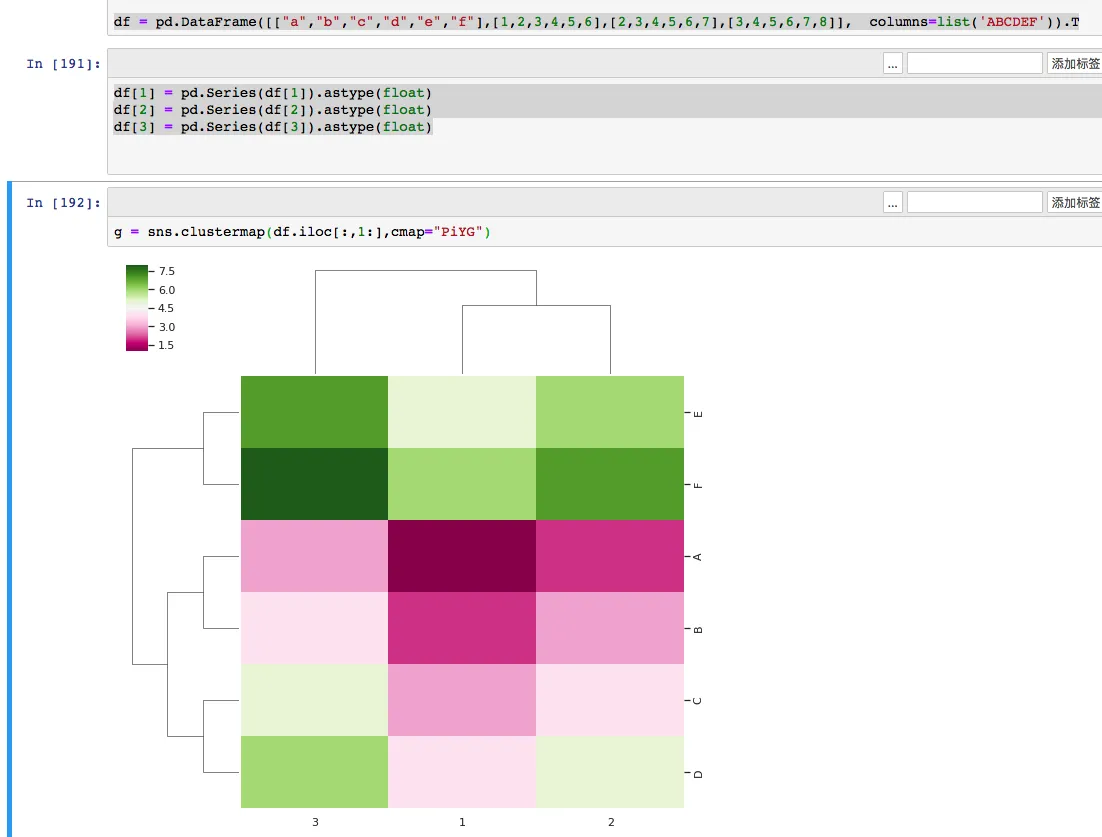
今天在使用python的seaborn画热图(clustermap)的时候,发现了总是出现这个错误,而且可以知道自己的数据完全是符合条件的,在搜索了谷歌后也没有找到好的解决方法,经过摸索后这里把最终解决方法告诉大家。
这类报错看起来像是 Seaborn 的问题,实际更常见的原因是传进去的 DataFrame 列类型已经变成了 object,而不是可用于数值计算的类型。
1.生成dataframe
    import pandas as pd
    import numpy as np
    import matplotlib.pyplot as plt
    from seaborn import clustermap
    import seaborn as sns; sns.set(color_codes=True)
    df = pd.DataFrame([["a","b","c","d","e","f"],[1,2,3,4,5,6],[2,3,4,5,6,7],[3,4,5,6,7,8]],  columns=list('ABCDEF')).T
    df
    g = sns.clustermap(df.iloc[:,1:],cmap="PiYG")
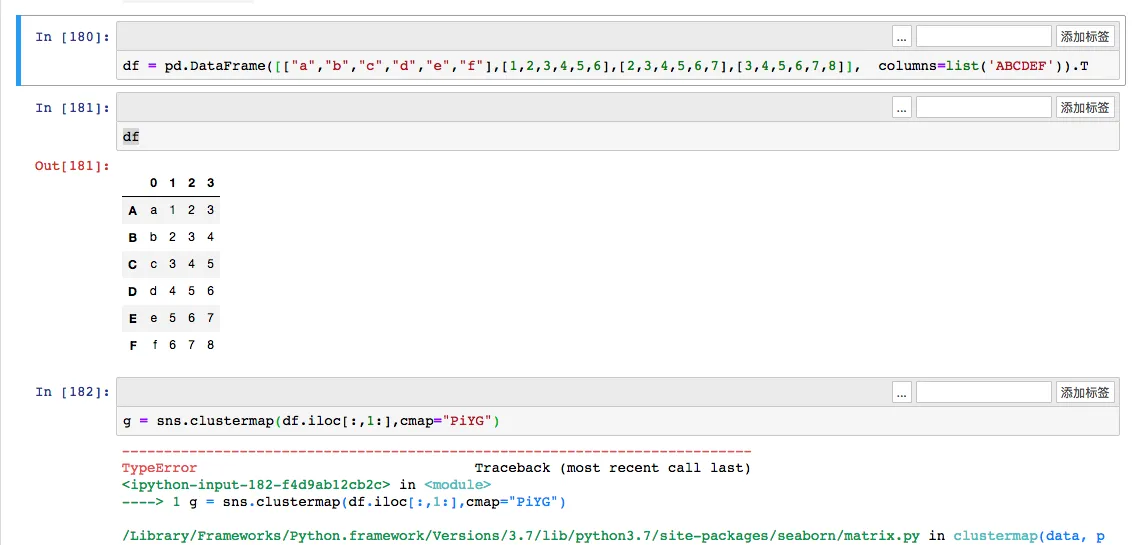
生成dataframe并转置后,出现类型错误,TypeError: ufunc ‘isnan’ not supported for the input types, and the inputs could not be safely coerced to any supported types according to the casting rule ”safe”
2.出错原因
出现这类错误在于dataframe经过了转置,而原来的dataframe中包含字符串的列,就像上面的例子中一样第一列是字符串,值为abcdef。那么经过转置后的dataframe所有的数字也全部变成了object而不再是float或者int的数字类型,所以当我们队字符类型进行热图绘制的时候自然出错。
这里如果dataframe本来全是数字型的话就不会出问题。
3.解决办法
知道原因,那么解决办法就简单了,把转置后的 dataframe 对应数字列统一转回数值类型即可。与其一列一列手工写 astype(float),更实用的方式是批量转换。
    import pandas as pd
    import numpy as np
    import matplotlib.pyplot as plt
    from seaborn import clustermap
    import seaborn as sns; sns.set(color_codes=True)
    df = pd.DataFrame([["a","b","c","d","e","f"],[1,2,3,4,5,6],[2,3,4,5,6,7],[3,4,5,6,7,8]],  columns=list('ABCDEF')).T
    df.iloc[:, 1:] = df.iloc[:, 1:].apply(pd.to_numeric, errors="coerce")
    print(df.dtypes)
    g = sns.clustermap(df.iloc[:,1:],cmap="PiYG")
这里 pd.to_numeric(..., errors="coerce") 的好处是更通用:列很多时不用手工一列列改,而且如果夹杂了不能转成数字的值,会先变成 NaN,更方便继续排查。
如果你想确认问题是否真的来自数据类型,可以先执行一次:
print(df.dtypes)
只要热图输入部分还是 object,就很容易再次触发这类 isnan 报错。
- 原文作者:春江暮客
- 原文链接:https://www.bobobk.com/245.html
- 版权声明:本作品采用 知识共享署名-非商业性使用-禁止演绎 4.0 国际许可协议 进行许可,非商业转载请注明出处(作者,原文链接),商业转载请联系作者获得授权。