Enable DNSSEC for Aliyun Domain to Prevent DNS Hijacking
While using Cloudflare daily, I found the free DNSSEC under DNS was not enabled. How can that be? Let’s first see what DNSSEC is.……
春江暮客的个人学习分享网站
In programming, even small tips or tools can make a big difference.
For example, a shortcut key or a helpful package might simplify a lot of work and double your efficiency.
Here I’ll share a few small tricks I often use.
pandas_profiling to Inspect DataFramesUnderstanding your data is essential before doing any analysis.
Although df.describe() and df.info() provide basic summaries, they’re limited with large or complex datasets.
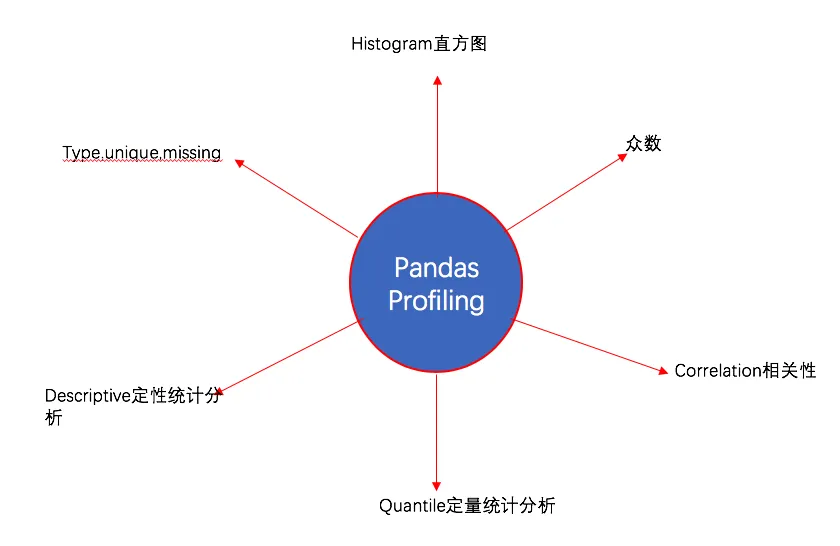
The pandas_profiling library offers detailed profiling through profile_report().
pip install pandas-profiling
# or
conda install -c anaconda pandas-profiling
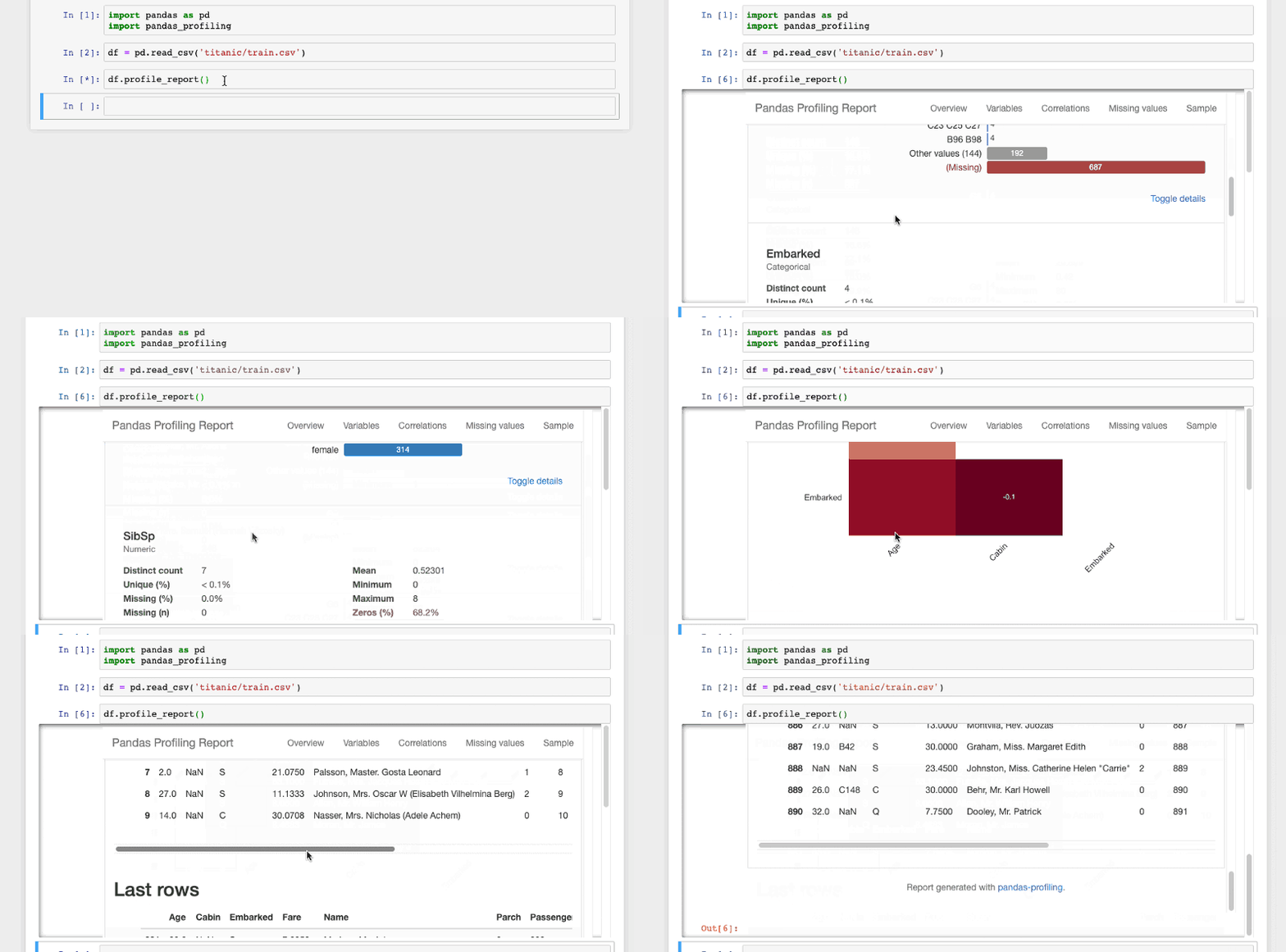
It’s very easy to use:
import pandas as pd
import pandas_profiling

df = pd.read_csv("train.csv")
df.profile_report()
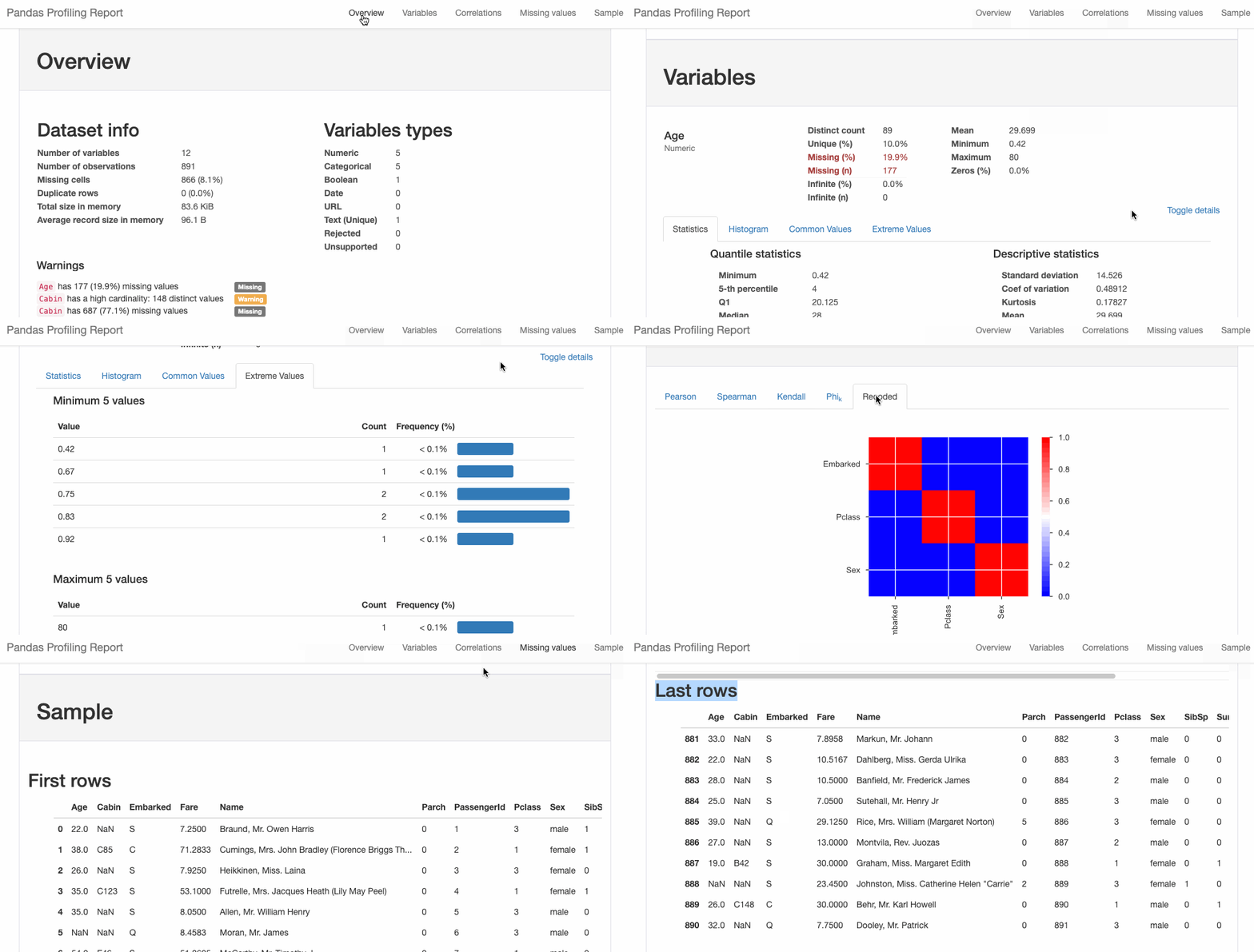
You can also export the report to HTML:
html = df.profile_report(title='Titanic Profiling Report')
html.to_file(outputfile="titanic_Profiling_Report.html")
cufflinksPandas has built-in plotting via .plot(), but it’s not interactive.
If you want interactivity, try the cufflinks package.
By default, the CentOS image on Alibaba Cloud comments out IPv6. Enabling it requires using a dual-stack IPv4 and IPv6 network, which needs to be applied for under beta testing—this isn’t very convenient. Instead, we can use an IPv6 tunnel provided by tunnelbroker.net to enable IPv6 access. Also, if you’re on campus and using China Telecom, you can get an IPv6 address directly. So, if the Alibaba Cloud server supports IPv6, you can browse the web for free.
vi /etc/sysctl.conf
Uncomment the following three lines and change the value from 1 to 0, as shown below:
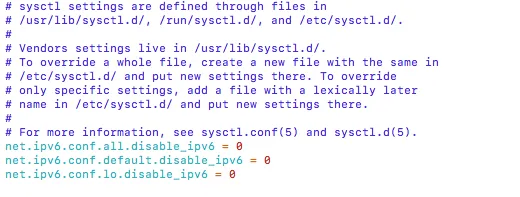
Then reload the configuration with:
sysctl -p
IPv6 should now be supported.
Go to https://tunnelbroker.net and register for an account. Make sure your password is complex enough or the registration may fail.
After logging in, go to the bottom left and select “Create Regular Tunnel”:
……Due to a new environment where the router does not support installing Shadowsocks or V2Ray, accessing Google to search vast technical content in English is not possible. Here, we use the official Google mirror container to build a Google mirror site and map it to our existing domain.
google.bobobk.com as the Google mirror domain.Steps to build the mirror site:
Since I use Cloudflare CDN, I’ll use it as an example.
……Writing web crawlers often leads to problems like IP bans or rate limits. Having an efficient IP proxy pool is quite important. Here, we introduce how to extract valid IPs from public proxy sources and build your own efficient crawler proxy pool.
requests to crawl proxiesrequests, using xici as an exampleAnonymous proxy page: xici, inspect elements.
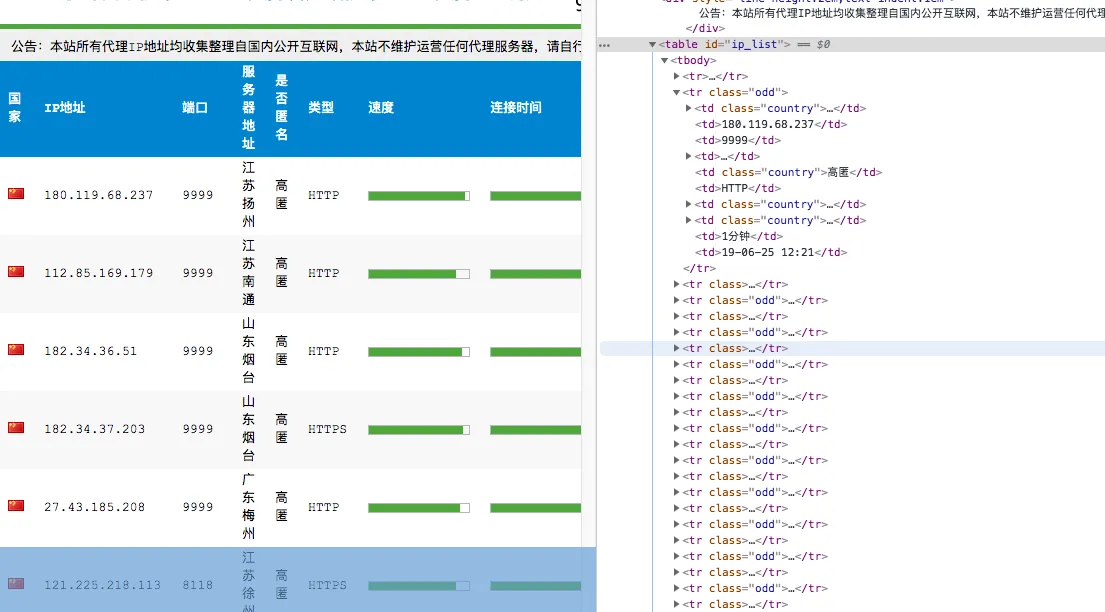
Each proxy is contained in a tr under the element with id ip_list, and detailed info is under td. Therefore, the CSS selector can be
content.css("#ip_list").css(“tr”), then extract the 1st and 6th elements.
Later, we add IP availability checking logic, and store successful ones into a JSON file. After that, available proxy information can be accessed via HTTP.
#!/root/anaconda3/bin/python

from scrapy.selector import Selector
import redis
import requests
import json
import requests
from requests.packages.urllib3.exceptions import InsecureRequestWarning
requests.packages.urllib3.disable_warnings(InsecureRequestWarning)
import random

def get_headers():
    USER_AGENT_LIST = [
    'Mozilla/4.0 (compatible; MSIE 7.0; Windows NT 5.1; WOW64; Trident/4.0; SLCC2; .NET CLR 2.0.50727; .NET CLR 3.5.30729; .NET CLR 3.0.30729; Media Center PC 6.0; 360SE)',
    'Mozilla/5.0 (Macintosh; Intel Mac OS X 10_13_6) AppleWebKit/537.36 (KHTML, like Gecko) Chrome/74.0.3729.169 Safari/537.36',
    'Mozilla/4.0 (compatible; MSIE 6.0; Windows NT 5.1; WOW64; Trident/4.0; SLCC2; .NET CLR 2.0.50727; .NET CLR 3.5.30729; .NET CLR 3.0.30729; .NET4.0C; .NET4.0E; 360SE)'
    'Mozilla/5.0 (Windows NT 10.0; Win64; x64) AppleWebKit/537.36 (KHTML, like Gecko) Chrome/64.0.3282.140 Safari/537.36 Edge/18.17763',
    '"Mozilla/5.0 (Linux; Android 6.0.1; Nexus 5X Build/MMB29P) AppleWebKit/537.36 (KHTML, like Gecko) Chrome/41.0.2272.96 Mobile Safari/537.36',
    'Mozilla/5.0 (Windows NT 10.0; WOW64) AppleWebKit/537.36 (KHTML, like Gecko) Chrome/58.0.3029.110 Safari/537.36 SE 2.X MetaSr 1.0',
    ]
    USER_AGENT = random.choice(USER_AGENT_LIST)
    return {'User-Agent':USER_AGENT}

def get_random_proxy():
    https_pro=[i for i in pro if "https" in i]
    if len(https_pro)==0:
        return None
    else:
        return https_pro[random.randint(0,len(https_pro))]

def crawl_ip():
    for i in range(5):
        rand_ip = get_random_proxy()
        if rand_ip:
            r =requests.get('https://www.xicidaili.com/nn/{}'.format(str(i+1)),headers=get_headers())
        else:
            r =requests.get('https://www.xicidaili.com/nn/{}'.format(str(i+1)),headers=get_headers(),proxies=proxies_ip(rand_ip))
        content = Selector(r)
        ip_list = content.css("#ip_list").css("tr")
        for i in ip_list[1:]:
            info = i.css("td::text").extract()
            ip = info[0]
            protoco = info[5].strip().lower()
            if protoco=="http" or protoco=="https":
                url = protoco + '://' + ip + ':' + info[1]
            else:
                url = 'http://' + ip + ':' + info[1]
            validate_ip(url)

def proxies_ip(url):
    if 'https' not in url:
        proxies={'http':url}
    else:
        proxies={'https':url}
    return proxies

def validate_ip(url):
    proxies = proxies_ip(url)
    if url not in pro:
        bobo_url=http_url
        if "https" in url:
            bobo_url=https_url
        try:
            r = requests.get(bobo_url, headers=get_headers(), proxies=proxies, timeout=1)
            pro.append(url)
            print('ip %s validated' % url)
        except Exception as e:
            print('cant check ip %s' % url)

def check_current_ip(): # Update and check usable proxies
    curr = open(JSON_PATH).read()
    if curr!='':
        for url in json.loads(open(JSON_PATH).read()):
            validate_ip(url)

if __name__ =='__main__':
    http_url = "http://www.bobobk.com"
    https_url = "https://www.bobobk.com"
    pro = []
    TXT_PATH = '/www/wwwroot/default/daili.txt'
    JSON_PATH='/www/wwwroot/default/daili.json'
    PROXYCHAIN_CONF='/www/wwwroot/default/proxy.conf'
    check_current_ip()
    crawl_ip()

    with open(JSON_PATH,'w') as fw:
        fw.write(json.dumps(list(set(pro))))
    fw.close()

    with open(TXT_PATH,'w') as fw:
        for i in set(pro):
            fw.write(i+"n")
    fw.close()
Before each page fetch, the script checks for usable proxies, and automatically uses them to fetch new ones. This setup can run stably.
……