boxes: An Interesting Command-Line String Shaping Tool
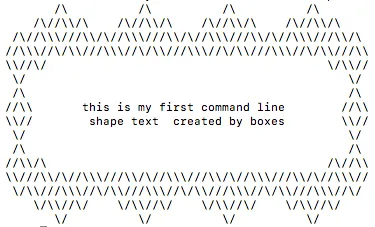
When you browse GitHub projects, help output, or even raw source files, you will sometimes notice neatly framed ASCII text blocks used for headings or comments. They do not change the functionality, but they make terminal output and code annotations look much more deliberate.
If you want to generate that style quickly, a simple command-line tool for the job is boxes.
Let’s look at an example first
yum install boxes -y
echo "this is my first command line\n shape text  created by boxes" | boxes -d diamonds -a hcvc
boxes is available in many Linux distributions, so in many cases you can install it directly with the system package manager. Here is an example using CentOS:
yum install boxes -y
On Debian or Ubuntu, you can usually try:
apt install boxes -y
boxes is a simple and practical utility that wraps text in ASCII-art-style borders. The default styles are often useful for source-code comments and terminal output, but it also includes more playful options such as dogs, diamonds, and other decorative frames. The example above uses the diamond shape. Here is the dog style:
echo "this is my first command line\n shape text  created by boxes" | boxes -d dog -a hcvc
          __   _,--="=--,_   __
         /  \."    .-.    "./  \
        /  ,/  _   : :   _  \/` \
        \  `| /o\  :_:  /o\ |\__/
         `-'| :="~` _ `~"=: |
            \`     (_)     `/
     .-"-.   \      |      /   .-"-.
.---{     }--|  /,.-'-.,\  |--{     }---.
 )  (_)_)_)  \_/`~-===-~`\_/  (_(_(_)  (
(     this is my first command line     )
 )     shape text  created by boxes    (
'---------------------------------------'
Common Use Cases
This kind of tool is especially useful for:
- section headers in command-line help output
- decorative comment blocks at the top of source files
- stage markers inside shell scripts
- README snippets that show terminal-style output
Generate your own text patterns
It looks fun, but it is also practical. You can even design your own shapes. For details, see https://boxes.thomasjensen.com/docs. Once you have a style you like, you can paste the generated text directly into your program output or source comments. Here is the peek shape as a final example:
echo "this is my first command line\n shape text  created by boxes" | boxes -d peek -a hcvc
/*       _\|/_
         (o o)
 +----oOO-{_}-OOo--------------+
 |this is my first command line|
 | shape text  created by boxes|
 +----------------------------*/
- 原文作者:春江暮客
- 原文链接:https://www.bobobk.com/en/185.html
- 版权声明:本作品采用 知识共享署名-非商业性使用-禁止演绎 4.0 国际许可协议 进行许可,非商业转载请注明出处(作者,原文链接),商业转载请联系作者获得授权。