Python Script to Query Recently Expired Domains
When you look for good domains, the most time-consuming part is often not the registration itself, but repeatedly filtering large domain lists to find names worth watching. That makes the discovery step a good candidate for automation.
The focus of this article is not automatic registration. The practical goal is to script the filtering step, export a shortlist of candidate domains, and then let you decide manually which ones are worth reserving.
There are many domain registrars in China; here, I’ll use Aliyun as an example to demonstrate how to use a script to automatically find desired domains.
Two Practical Limits First
- This article analyzes request parameters and query results, so the platform may change token rules, parameter names, or response structures later.
- The script only produces a candidate list. It does not guarantee that a domain will still be available by the time you try to reserve it.
Network Request Analysis
First, let’s analyze the request parameters and content for Aliyun’s domain filtering feature to facilitate automation with Python.
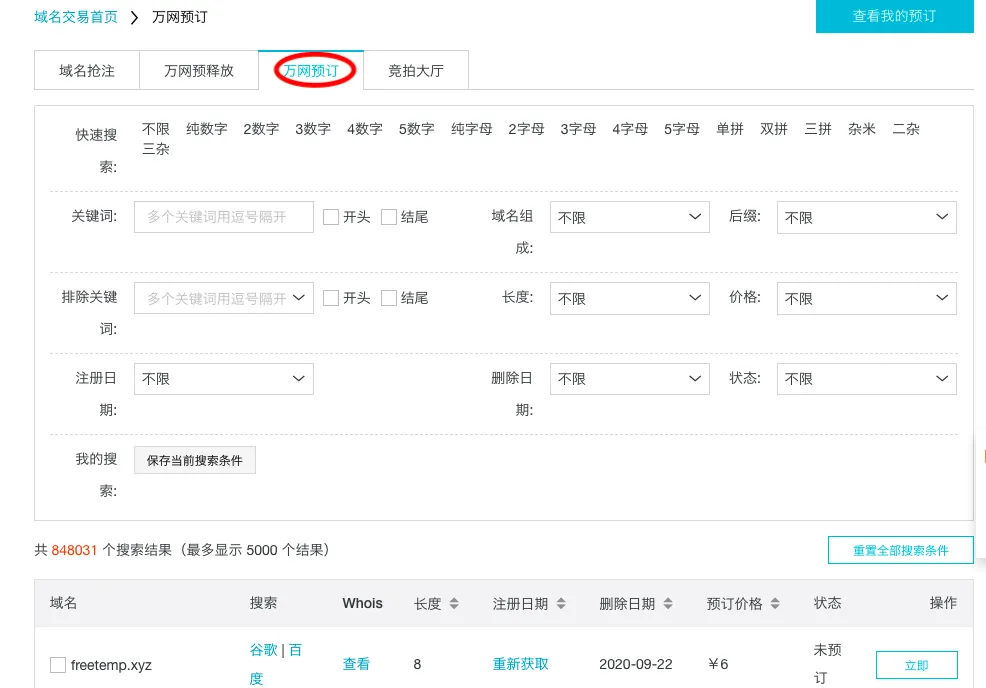
Open the domain trading homepage
Since the cheapest way to register a domain is to re-register an expired one, we’ll choose the “Wanwang Pre-registration” (万网预订) option here.
For building a website, we naturally don’t want junk domain suffixes, so I’ll only select .com. The earlier the registration date, the better; here, the earliest is 2006, which means these are 14-year-old domains. So, I’ll choose 2006. For the status, select “Unreserved” (未预定). Using Google Chrome’s network tab, we can find the corresponding domain search request URL: domainapi.aliyun.com. The parameters can be viewed in the browser, as shown:
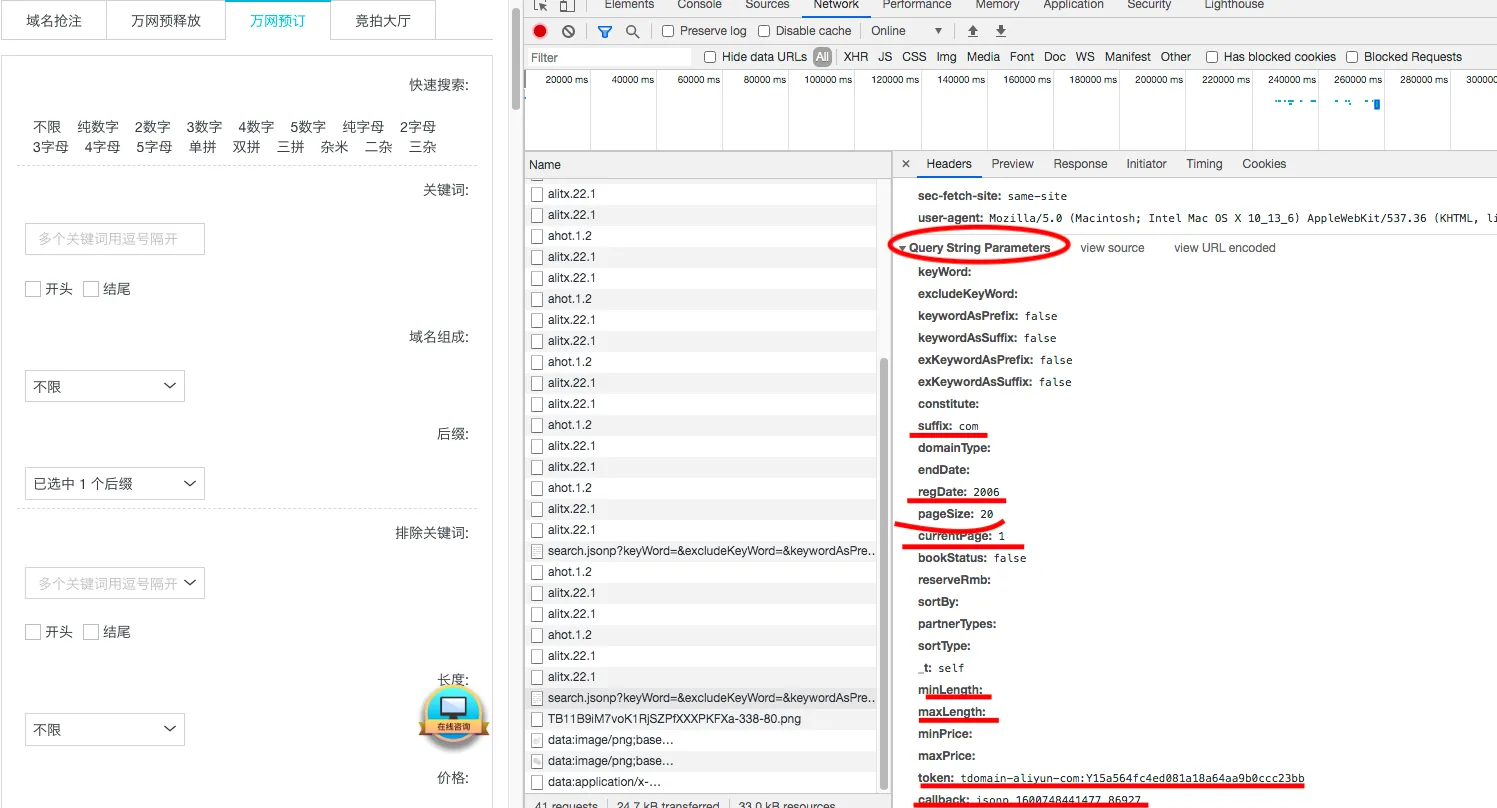
You can see the details of the GET request parameters:
suffix: Corresponds to the domain suffix.regDate: Corresponds to the registration date.pageSize: Corresponds to the number of domains per page. You can modify this parameter to get up to 1000 domains at once.currentPage: Corresponds to the current page.bookStatus: Indicates if it’s reserved (falsefor unreserved,truefor reserved).maxLength: Domain length. Shorter is better, so I set it to 5.token: Authentication parameter, analyzed below.callback: Return format. For convenience, we can change it to JSON format, which Python’sjsonpackage can directly use.
The most crucial part is obtaining the token parameter. Searching the network requests didn’t reveal the source of this request. Does that mean we can’t get the authentication token? Of course not!
We can obtain it through an indirect method. Parameters must be obtained via browser requests. If the request isn’t directly visible, it’s likely because it’s a jQuery request that wasn’t logged directly. We can obtain it by requesting the original address, which is Aliyun Domain Pre-registration. To prevent the request from being refreshed, first enable the “Record history” option in Google Chrome, as shown:

Then, open a clean tab, open the inspection options, enable “Record history” as shown above, and visit Aliyun Domain Pre-registration.
You should find the current token, for example, Y15a564fc4ed081a18a64aa9b0ccc23bb.
Next, search for HTML and JSON requests to find where the token appears.

Automatic Domain Query
The network requests are now clear. The next step is to write the automation script based on these requests.
The script below is best treated as a batch filter: fetch candidate domains first, then apply your own manual review and registrar-side checks.
Here’s the code:
# This script will generate an ali_domain.txt file containing a list of available domains in the current directory.
# It does not include automated registration with the registrar.
# Please be aware.
## Import necessary packages
import requests
import pandas as pd
import json
import time
TIMEOUT = 10
headers = {"Referer":"[https://wanwang.aliyun.com/domain/reserve](https://wanwang.aliyun.com/domain/reserve)",
"user-agent":"Mozilla/5.0 (Macintosh; Intel Mac OS X 10_13_6) AppleWebKit/537.36 (KHTML, like Gecko) Chrome/84.0.4147.125 Safari/537.36",
}
def get_token():
tokenurl = "[https://promotion.aliyun.com/risk/getToken.htm](https://promotion.aliyun.com/risk/getToken.htm)"
text = requests.get(tokenurl,headers=headers).text
return json.loads(text)["data"]
def get_domains(token,regd="2006"):
### Modify parameters here directly. I've set it to 100 records per page, meaning 100 domains, just checking the first page.
### Suffix: com, maximum domain length: 5, return format: json.
url = "[https://domainapi.aliyun.com/preDelete/search.jsonp?keyWord=&excludeKeyWord=&keywordAsPrefix=false&keywordAsSuffix=false&exKeywordAsPrefix=fa](https://domainapi.aliyun.com/preDelete/search.jsonp?keyWord=&excludeKeyWord=&keywordAsPrefix=false&keywordAsSuffix=false&exKeywordAsPrefix=fa)\
lse&exKeywordAsSuffix=false&constitute=&suffix=com&domainType=&endDate=®Date={}&pageSize=100¤tPage=1&bookStatus=false&reserveRmb=&sortBy=1&pa\
tnerTypes=&sortType=1&_t=self&minLength=&maxLength=5&minPrice=&maxPrice=&token=tdomain-aliyun-com%3A{}&callback=json".format(regd,token)
text = requests.get(url,headers=headers,timeout = TIMEOUT).text
# Get content based on JSON structure
domains = json.loads(text.split("(")[1].split(")")[0])
return domains
## Manually add token here (example values usually expire)
token = "Y15a564fc4ed081a18a64aa9b0ccc23bb" # This token is an example and may be expired.
## Get token automatically via Aliyun's API
token = get_token()
print(token)
## Filename for saving searched domains
filename = "ali_domain.tsv"
## Clear file content on each run
with open("ali_domain.tsv",'w') as fw:
fw.close()
# Search year by year from 2006 to 2010 and write to a CSV file
for i in range(2006,2010):
domains = get_domains(token,regd=str(i))
if domains["code"]=="200":
domains = domains["data"]["pageResult"]["data"]
domains = pd.DataFrame.from_dict(domains)
domains = domains[~domains.short_name.str.contains("-")]
print(domains)
domains.to_csv(filename,index=None,mode="a",sep="\t")
time.sleep(20)
updated script
import sys
import requests
import pandas as pd
import json
import time
import os
os.environ['HTTP_PROXY'] = 'http://127.0.0.1:1081'
TIMEOUT = 10
headers = {"Referer":"https://wanwang.aliyun.com/domain/reserve",
"user-agent":"Mozilla/5.0 (Macintosh; Intel Mac OS X 10_13_6) Apple: WebKit/537.36 (KHTML, like Gecko) Chrome/84.0.4147.125 Safari/537.36",
}
def get_token():
tokenurl = "https://promotion.aliyun.com/risk/getToken.htm"
text = requests.get(tokenurl,headers=headers).text
return json.loads(text)["data"]
def get_df(token,regd="2006"):
url = f"https://domainapi.aliyun.com/preDelete/search.jsonp?keyWord=&excludeKeyWord=&keywordAsPrefix=false&keywordAsSuffix=false&exKeywordAsPrefix=false&exKeywordAsSuffix=false&constitute=&suffix=com&domainType=&endDate=®Date=&pageSize=500¤tPage=1&bookStatus=0&reserveRmb=&sortBy=1&patnerTypes=&sortType=1&_t=self&minLength=&maxLength=8&minPrice=&maxPrice=&token=tdomain-aliyun-com%3A{token}&callback=json"
#print(url)
text = requests.get(url,headers=headers,timeout = TIMEOUT).text
res = json.loads(text.split("(")[1].split(")")[0])
return res
token = get_token()
filename = "/home/teng/ali.txt"
def has_pairs(s):
if s[0]==s[1] or s[1]==s[2] or s[2]==s[3]:
return True
return False
df_list = []
# Loop through the years and process the data
for i in range(2006, 2010):
df = get_df(token, regd=str(i))
if df["code"] == "200":
df = df["data"]["pageResult"]["data"]
df = pd.DataFrame.from_dict(df)
# Filter out rows based on the conditions
filters = ['-', 'z', '2', 'i', 'l', '1', 'o', '0','q','9','g']
for f in filters:
df = df[~df.short_name.str.contains(f)]
# Apply the has_pairs function
df['pairs'] = df['short_name'].apply(has_pairs)
df = df[df.pairs == True]
# Append the filtered dataframe to the list
df_list.append(df)
domains = pd.concat(df_list, ignore_index=True)
ori = pd.read_csv(filename, sep=',')
domains = domains.drop_duplicates()
print(domains)
domains = pd.concat([ori, domains]).reset_index(drop=True)
domains = domains.drop_duplicates()
domains.to_csv(filename, index=None, mode="w")
After running, view a portion of the file content:
head -n 40 ali_domain.tsv
The results are as follows (the current domain data was generated on September 22, 2020; run the script yourself for the latest results). If there’s demand, I might create a dedicated webpage to display the latest available 4-5 character .com domains.
    beian  book_status  domain_len domain_name    end_date  price    reg_date short_name  pairs
0       0            0           4    n344.com  2025-06-06   83.0  2021-12-14       n344   True
1       0            0           4    6ycc.com  2025-06-06   83.0  2023-03-20       6ycc   True
2       0            0           4    6fpp.com  2025-06-06   83.0  2024-04-15       6fpp   True
3       0            0           4    t33k.com  2025-06-06   83.0  2023-03-28       t33k   True
4       0            0           4    y55n.com  2025-06-06   83.0  2018-10-20       y55n   True
5       0            0           4    k88u.com  2025-06-06   83.0  2024-03-28       k88u   True
6       0            0           4    kkt8.com  2025-06-06   83.0  2021-03-18       kkt8   True
7       0            0           4    aad4.com  2025-06-06   83.0  2024-03-18       aad4   True
8       0            0           4    xx4x.com  2025-06-06   83.0  2021-03-19       xx4x   True
9       0            0           4    5khh.com  2025-06-06   83.0  2012-03-18       5khh   True
10      0            0           4    yaa4.com  2025-06-06   83.0  2024-03-18       yaa4   True
11      0            0           4    77u5.com  2025-06-06   83.0  2024-03-17       77u5   True
12      0            0           4    ppk5.com  2025-06-06   83.0  2015-03-27       ppk5   True
13      0            0           4    b4mm.com  2025-06-06   83.0  2024-03-20       b4mm   True
14      0            0           4    s66r.com  2025-06-07   83.0  2023-03-21       s66r   True
15      0            0           4    u66b.com  2025-06-07   83.0  2023-03-21       u66b   True
16      0            0           4    y77n.com  2025-06-07   83.0  2019-08-15       y77n   True
17      0            0           4    ww7c.com  2025-06-07   83.0  2024-03-29       ww7c   True
Conclusion
This workflow is mainly useful for saving time on the discovery step: analyze the request once, encode the common filters in Python, and export candidate domains into a file for later review. That is much faster than repeatedly clicking filters in the web UI.
If the script stops working later, check three things first: whether the token format changed, whether the request parameters changed, and whether the JSON response path was updated by the platform.
- 原文作者:春江暮客
- 原文链接:https://www.bobobk.com/en/731.html
- 版权声明:本作品采用 知识共享署名-非商业性使用-禁止演绎 4.0 国际许可协议 进行许可,非商业转载请注明出处(作者,原文链接),商业转载请联系作者获得授权。