Detailed Examples of Seaborn Plotting Kernel Density Curves
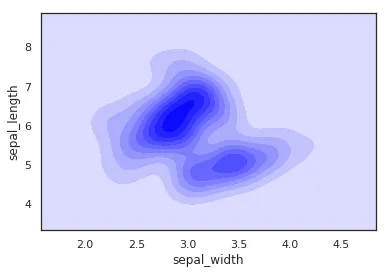
In a frequency distribution histogram, when the sample size is sufficiently enlarged to its limit, and the bin width is infinitely shortened, the step-like broken line in the frequency histogram will evolve into a smooth curve. This curve is called the density distribution curve of the population.
This article walks through how to use Seaborn with the Iris dataset in Pandas to plot several common kinds of kernel density curves.
1. Basic Density Curve
    import seaborn as sns
    import pandas as pd
    sns.set(color_codes=True)
    sns.set_style("white")
    df = pd.read_csv('iris.csv')
    sns.kdeplot(df['sepal_width'])
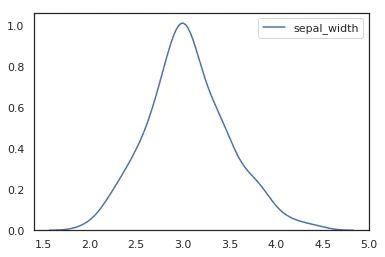
To plot a kernel density curve using Seaborn, you only need to use kdeplot. Note that a density curve only requires one variable; here we choose the sepal_width column.
2. Density Curve with Shading
    import seaborn as sns
    import pandas as pd
    sns.set(color_codes=True)
    sns.set_style("white")
    df = pd.read_csv('iris.csv')
    sns.kdeplot(df['sepal_width'], fill=True)
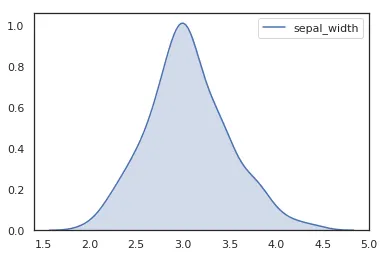
In recent Seaborn versions, fill=True is the clearer way to draw the shaded area.
3. Horizontal Density Curve
    import seaborn as sns
    import pandas as pd
    sns.set(color_codes=True)
    sns.set_style("white")
    df = pd.read_csv('iris.csv')
    sns.kdeplot(y=df['sepal_width'], fill=True)
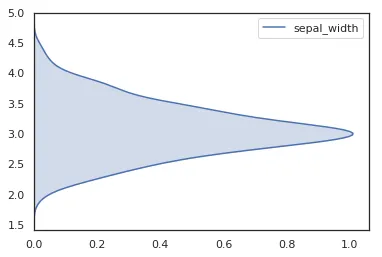
If you want the density curve to extend along the vertical axis, passing the series with y= is usually the most direct approach.
4. Bandwidth Adjustment
    import seaborn as sns
    import pandas as pd
    sns.set(color_codes=True)
    sns.set_style("white")
    df = pd.read_csv('iris.csv')
    p1 = sns.kdeplot(df['sepal_width'], fill=True, bw_adjust=.5, color="red")
    p1 = sns.kdeplot(df['sepal_width'], fill=True, bw_adjust=.05, color="blue")
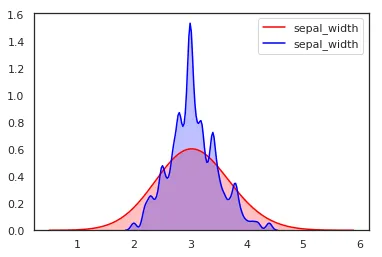
Different bandwidth settings produce different density curves for the same data. A smaller bandwidth usually makes the curve less smooth.
5. Comparing Density Curves of Multiple Variables
    import seaborn as sns
    import pandas as pd
    sns.set(color_codes=True)
    sns.set_style("white")
    df = pd.read_csv('iris.csv')
    p1=sns.kdeplot(df['sepal_width'], fill=True, color="red")
    p1=sns.kdeplot(df['sepal_length'], fill=True, color="blue")
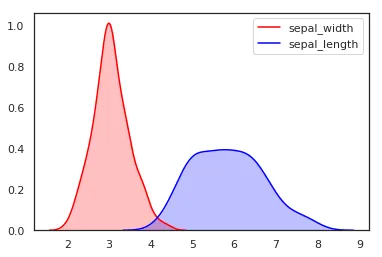
For multiple variables, we simply plot two density maps together.
6. Density Curve for Two Variables (Scatter Density)
    import seaborn as sns
    import pandas as pd
    sns.set(color_codes=True)
    sns.set_style("white")
    df = pd.read_csv('iris.csv')
    sns.kdeplot(data=df, x='sepal_width', y='sepal_length', fill=True, color="red")
It’s important to note that this cool map-like density curve is a different concept from the previous plot. One shows separate density curves for multiple variables, while this one is a density curve for two-dimensional data, where x and y appear as a combination.
Summary:
This article gives a practical introduction to kdeplot and several common density-plot patterns in Seaborn. For more parameters and up-to-date behavior, refer to the official documentation.
- 原文作者:春江暮客
- 原文链接:https://www.bobobk.com/en/263.html
- 版权声明:本作品采用 知识共享署名-非商业性使用-禁止演绎 4.0 国际许可协议 进行许可,非商业转载请注明出处(作者,原文链接),商业转载请联系作者获得授权。